Pull request checks
With pull request checks enabled, Oneleet scans each pull request that targets the repository’s target branch and reports the result as a GitHub check named Oneleet Code Security Scan. Findings that already exist on the target branch never fail the check, so enabling PR checks on a codebase with a backlog of findings won’t block anyone’s work.
Which pull requests are scanned
Section titled “Which pull requests are scanned”- Only pull requests targeting the repository’s configured target branch are scanned.
- Draft pull requests aren’t scanned until they’re marked ready for review.
- Pull request checks are currently available for GitHub repositories.
| Scan outcome | Check result |
|---|---|
| No new findings | Pass |
| At least one new finding | Fail |
| No completed scan of the target branch yet | Neutral |
| The scan itself failed | Fail, with the error in the summary |
How “new” is decided
Section titled “How “new” is decided”The comparison baseline is the most recent scan of the repository’s target branch. When a pull request is scanned:
- Only the files the PR changes are examined, and only findings on lines the PR added (or in files it added) are considered.
- Findings are matched against your target branch’s baseline – for instance, if you’re targeting
main, and a PR simply moves code associated with a finding onmainto a different location. This is an imperfect heuristic check. - Findings suppressed by an ignore rule don’t count as new.
When pull request checks are enabled, it’s important to have an up-to-date baseline, so we scan your default target branch (e.g., main) on every push in addition to the usual daily schedule.
What developers see
Section titled “What developers see”A failing check summarizes the new findings by severity. Each finding appears as an annotation on the offending lines, visible in the PR’s Files changed and Checks tabs, with its severity, confidence, rule ID, and a link to remediation guidance.
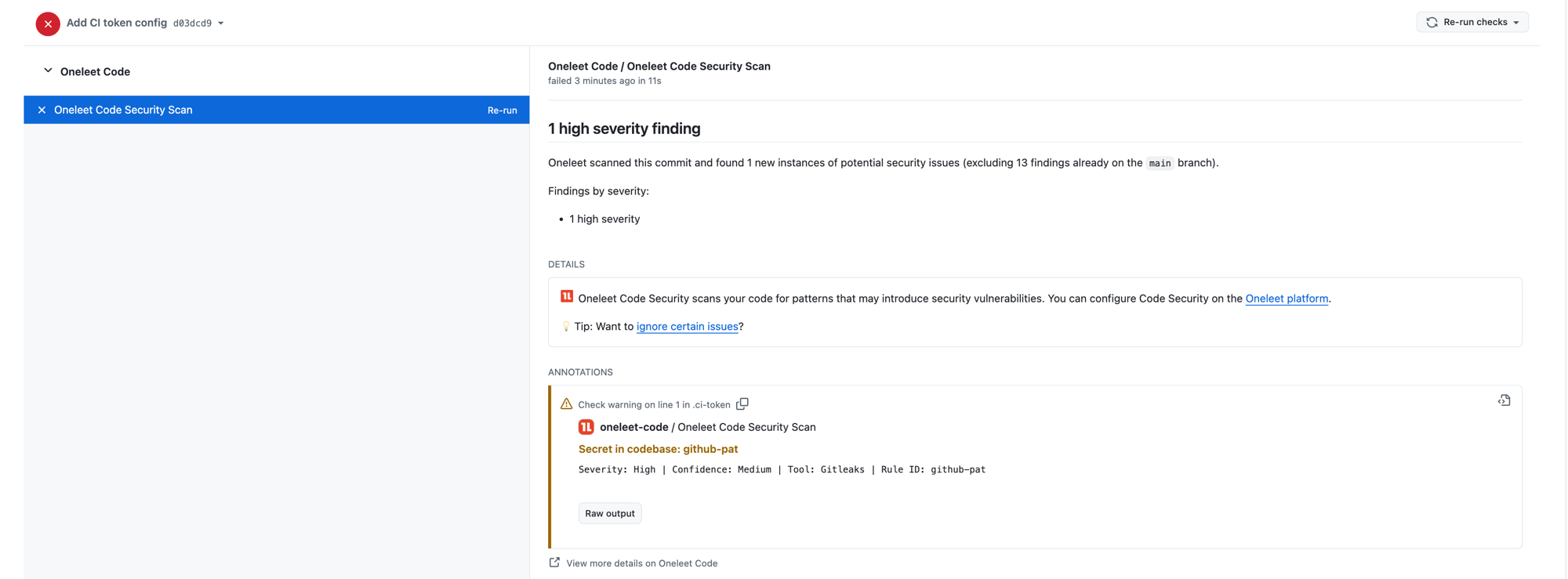
To make a failing check pass, either fix the findings in the pull request (every new commit is rescanned), or merge and triage the findings on the Code Security page afterwards. You can also re-run the check from GitHub’s re-run button.
Enabling pull request checks
Section titled “Enabling pull request checks”Pull request checks are configured per repository:
- Make sure the repository is added to Code Security via the GitHub (Code) integration.
- Open Code security → Configure → Repositories, select the repository, and enable Automatically scan pull requests for new findings.
Until the repository’s first target-branch scan completes, PR checks report a neutral result, because there’s no baseline to compare against yet.
Blocking merges
Section titled “Blocking merges”The check reports pass or fail. Whether that blocks merging is up to your branch protection rules. To enforce it, add Oneleet Code Security Scan as a required status check in the repository’s GitHub branch protection or rulesets.